

Who this is for
This service is for businesses that want a simpler, easier-to-manage website without going through a full redesign.
You may be ready to move from WordPress if:
Your website has become slow or clunky due to accumulation of plugins.
You’re tired of keeping WordPress and plugins updated.
Your website has been hacked before, and you’re concerned about its security.
Small updates take too long to make, making it hard to keep your business information on the website up-to-date.
You want to manage your website yourself instead of relying on a web developer.
This migration does not include:
A complete website redesign
Major changes to your website's functionality or user experience
If your website needs significant improvements as well as a platform migration, view Custom Website Strategy & Design service instead.
Moving a website to a new platform requires technical knowledge and a considerable amount of time. We’re here to take that work off your plate, so the hassle of migrating doesn’t keep you stuck on a platform that no longer works for you.

Traffic after migration
While platform migration can bring worries about losing traffic, in our experience, post-migration traffic increase actually happens frequently enough to be optimistic.
Moving from WordPress to Squarespace can sometimes create opportunities for traffic growth because of two reasons:
Stronger technical foundation: Moving from an older or poorly maintained WordPress website to Squarespace can improve technical SEO, site structure, and user experience. These are positive signals that can make your web pages rank better.
Easier content publishing process: Squarespace’s ease of use makes it easier to keep the site up-to-date and create more valuable content.
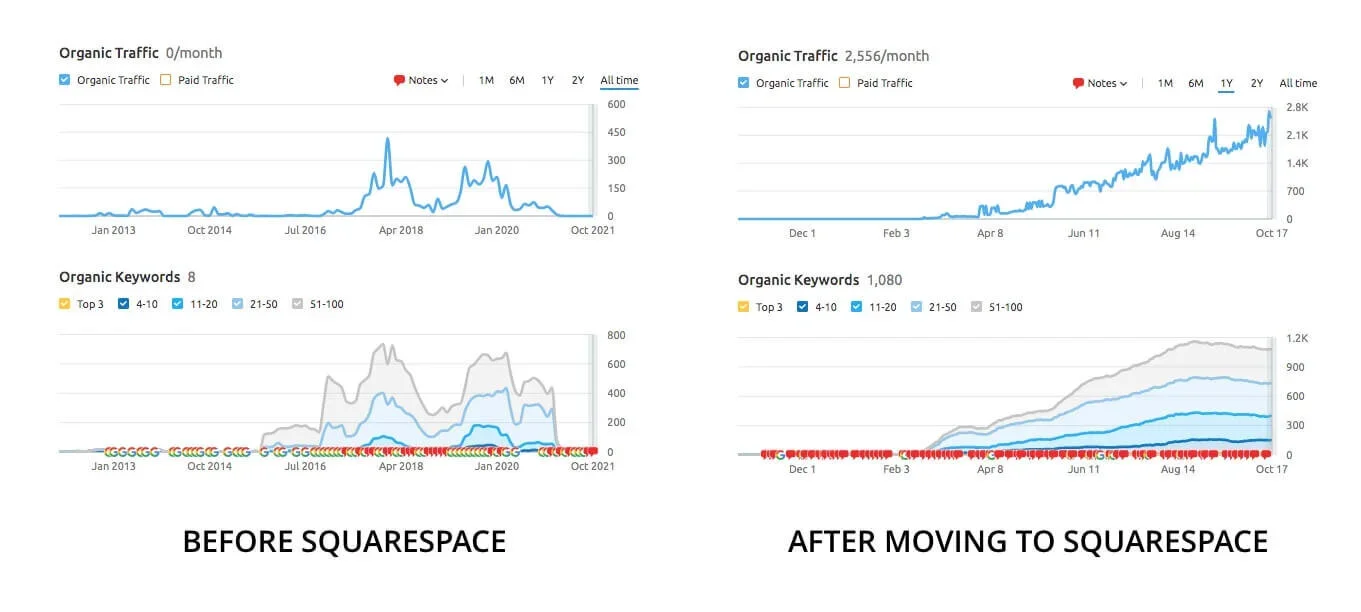
Example: This WordPress website had existed for 7 years, with peak traffic reached around 300–400 visits per month. Within 6 months after we migrated it to Squarespace, organic traffic grew to approximately 2,500 visits per month.
What's included in a WordPress to Squarespace migration?
We'll recreate your website in Squarespace and take care of SEO details.

Website pages and content
We'll recreate your existing pages, content, navigation, and functionality while adapting them to the new platform.
Rebuild existing website pages
Transfer blog posts and adjust formatting as needed
Recreate forms and standard functionality
Find Squarespace alternatives for plugins that aren't compatible
Check the website across desktop and mobile

SEO and URLs
Moving a website can affect search visibility if URLs and SEO elements aren't handled properly. We’ll provide:
SEO review
URLs inventory
301 redirects
SEO page titles and descriptions
Image file names and alt text
Sitemap and indexing
Verify on Google Search Console

Domain and launch
We'll also handle the technical steps and training involved in launching your Squarespace website, including:
Connect domain to Squarespace
Publish the website
Provide Squarespace tutorials
Set up Google Search Console and Google Analytics
Monitor traffic after launch
Troubleshoot Google Search Console issues
What you’ll gain
Keep what’s working
Preserve your existing content, domain authority, and website structure.
Minimize disruption
Implement the transition carefully to reduce interruptions to your website and business.
Protect your search presence
Handle URLs, redirects, and SEO details during the move.
Avoid technical headaches
We take care of the rebuilding, platform differences, and troubleshooting.
Easy start on Squarespace
We provide personalized tutorials and answer your questions about Squarespace.
Have someone to turn to
Get help with your Squarespace website any time you need it.
How much does WordPress to Squarespace migration cost?
Every website is different, so migration is custom priced after reviewing your existing website. The cost depends on factors such as:
Number of pages
Website structure
Whether functions can be rebuilt easily
SEO and redirect requirements
Other technical aspects
If your website is fairly old and need a lot of improvements, we recommend doing a full website revamp instead.
What we require to provide a quote:
Current website URL
Problems you current have with the website
Pages to transfer (a list of pages or a rough page count)
Important functions you want to keep
Additional pages or functions you’d like to add
The process
Plan
Tell us about your project. We’ll review your site, schedule a call to discuss project details, and send you a custom quote.
Implementation
We build and test your website in Squarespace. You’ll have ample time to review and provide feedback.
Launch
We connect your existing domain to the new website and guide you through the steps to complete the move over.
Hand-off
We give you tutorials, and monitor your website analytics after launch to ensure everything works as intended.
Ready to move to Squarespace?
Send us your website details and we’ll review your current site, confirm the requirements, and provide a custom quote.
Frequently asked
-
Changing platforms does not automatically mean losing your search rankings. However, migration needs to be handled carefully. We'll preserve important SEO settings and set up redirects when URLs change to help search engines understand where your pages have moved.
-
Not necessarily. Squarespace and WordPress use different systems, so some elements may need to be adapted to work properly in Squarespace. The goal is to preserve your existing website's overall structure and visual direction while making sure it works well on the new platform.
-
Yes. Your domain can remain the same when you move from WordPress to Squarespace. We'll handle the domain connection and the technical steps needed to point your domain to the new website.
-
Yes, we can do that, but you need to continue keeping ownership of the previous domain name.
-
Content migration and website setup often takes two weeks. Larger websites with features that require custom codes and testing may take longer.
-
To plan your project we need:
Current website URL
Problems you have with the current website
Pages to transfer (a list of pages or a rough page count)
Important functions you want to keep
Additional pages or functions you’d like to add during the migration
Later, for implementation, we'll require admin access to your current Wordpress website.